Build the ITGmania machine.
Turn an existing Gigabyte Z270 / GTX 660 PC into a dedicated ITGmania rig for the pad. ITGmania is the actively-maintained StepMania 5.1 fork the ITG/DDR community runs on — better pad input and timing than vanilla StepMania.
The box is wildly over-spec for ITGmania. The engine's floor is a 700 MHz CPU, 512 MB RAM, and OpenGL 2.1 — every part clears that by orders of magnitude. Performance is never the problem. There's exactly one real decision: the GTX 660's dead-end drivers.
What goes where
Green = keep · Blue = recommended replace · Amber = verify or add.
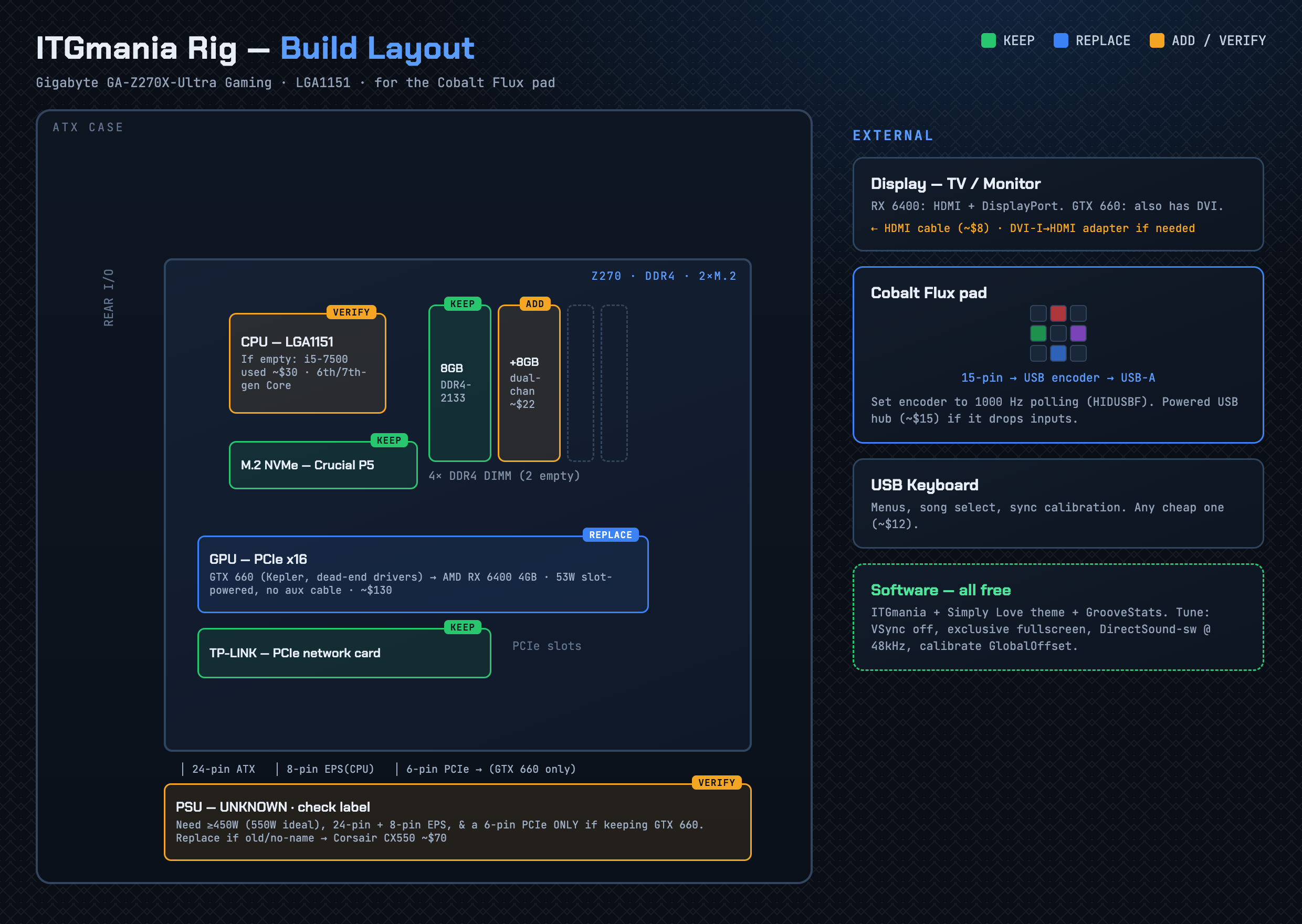
Pick your path: the GPU
The GTX 660 is Kepler — NVIDIA ended its drivers in 2024 (last Windows 475.14, Linux 470.256.02, both EOL; the Linux one breaks on modern kernels). The card still runs ITGmania fine; it's purely a driver-longevity call.
Keep the GTX 660
- Run Windows with driver 475.14 — installs on Win 10/11, runs the game fine.
- You're on a frozen, unpatched GPU driver — fine for an offline/dedicated cab.
- Don't pick Linux here — Kepler drivers are a maintenance headache.
Drop in an AMD RX 6400
- 53W, slot-powered — no PSU cable, drops into the x16 slot.
- Modern AMD drivers, no EOL in sight; 4GB handles HD backgrounds/video.
- Runs either OS. Ends the Kepler problem for good.
Cost tiers
Tier 1 — just get it running ~$20
Tier 2 — recommended rig ~$185
Full component breakdown with live-search links is on the Parts page.
Latency tuning
Rhythm games live or die on input/audio sync. Do these once it boots, in order of impact. Or just grab the pre-tuned Preferences.ini ⬇.
USB polling → 1000 Hz
Windows: install HIDUSBF, set the encoder to 1000, verify in Gamepad Tester. Default is 125 Hz (8 ms) — the single biggest win. Firmware-capped encoders need an Arduino/Teensy board.
Video: VSync off, exclusive fullscreen
Vsync=0 · Windowed=0 · RefreshRate= your display's native rate. Lowest, most consistent latency.
Audio (Windows)
SoundDrivers=DirectSound-sw and SoundPreferredSampleRate=48000 (fixes a lot of music drift). Avoid Bluetooth audio.
Display lag
Leave VisualDelaySeconds=0 on a monitor; set it to the TV's input lag in seconds (e.g. 0.030) if playing on a TV.
Calibrate the global offset
In-song press F6 twice for "AutoSync Machine," play a clear-beat song stepping to the audio, accept, repeat 2–3×. Fine-tune with Alt+Shift+F11/F12. Typically lands ~ -0.030 to -0.070.
Mind the ITG "9 ms bias"
Most ITG-era packs are authored +9 ms. Mixing old and new packs? Run nine-or-null to unify sync.
Where to get everything
The repair guide covers panel fixes, the control box, parts, and the wiring pinout.